DirectInput Samples
The latest version of this sample is hosted on GitHub.
These are the original DirectX SDK Win32 samples for the legacy DirectInput API updated to build with Visual Studio 2012 without using the DirectX SDK.
These samples are based on legacy DirectX SDK DirectInput samples that were shipped as part of the DirectX 8.0 SDK (circa 2000) for Win32 desktop applications running on Windows XP, Windows Vista, Windows 7, and Windows 8. This is not intended for use with Windows Store apps or Windows RT.
The DirectInput API is not available for Windows Store apps or on Windows RT (aka Windows on ARM). The Xbox 360 Common Controller and the XINPUT API is the recommended solution for modern game controllers and is supported on these platforms.
The DirectInput API is not recommended for use for traditional mouse and keyboard data, and use of standard Win32 messages is preferred. This is why the older DirectX SDK samples "Keyboard" and "Mouse" are not included in the latest DirectX SDK or this package.
The DirectInput API's remaining utility is for driving HID-only game controllers, haptic devices, and custom force-feedback devices.
Description
CustomFormat

This sample illustrates the use of a custom data format.
Note: If your mouse has more than four buttons, not all of the buttons will be used by this sample.
The comments in CustomFormat.cpp explain how to create, initialize, and retrieve data with a custom data format. You might want to use a custom data format for adding support for a non-standard input device. By enumerating the device objects, you can determine exactly what data is available. The data format you create specifies how the data you are interested in will be stored.
For compatibility, this sample creates a new format to store mouse data. Usually, you would want to use one of the provided c_dfDIMouse types, but the steps taken to create the custom format will be the same for any hardware device. For more information, see IDirectInputDevice8::SetDataFormat.
FFCont
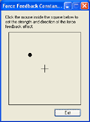
The FFConst sample program applies raw forces to a force-feedback input device, illustrating how a simulator-type application can use force feedback to generate forces computed by a physics engine.
You must have a force-feedback device connected to your system in order to run the application.
When you run the application, it displays a window with a crosshair and a black spot in it. Click anywhere within the window's client area to move the black spot. (Note that moving the device itself does not do anything.) FFConst exerts a constant force on the device from the direction of the spot, in proportion to the distance from the crosshair. You can also hold down the mouse button and move the spot continuously.
This sample program enumerates the input devices and acquires the first force-feedback device that it finds. If none are detected, it displays a message and terminates.
When the user moves the black spot, joySetForcesXY function converts the cursor coordinates to a force direction and magnitude. This data is used to modify the parameters of the constant force effect.
Joystick
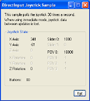
The Joystick sample program obtains and displays joystick data.
The application polls the joystick for immediate data in response to a timer set inside the dialog procedure.
Building for Windows XP
The DirectInput legacy API is available on Windows XP, so this sample can be built using Visual Studio 2012 with the Windows XP compatible Platform Toolset "v110_xp" included with
Visual Studio 2012 Update 1. Remove the link references to DXGUID.LIB. You will need to locally define the required GUIDs by using
#define INITGUID before including dinput.h in one of the modules.
Building with Visual Studio 2010
It is possible to modify these projects to build with Visual Studio 2010 without using the legacy DirectX SDK. Set the Platform Toolset to "v100" for all configurations, and then remove the link references to
DXGUID.LIB. You will need to locally define the required GUIDs by using
#define INITGUID before including dinput.h in one of the modules.
Building with Visual Studio 2013
This sample can be modified to build with Visual Studio 2013 using the Windows 8.1 SDK.
You can allow VS 2013 to upgrade the projects in place to use Platform Toolset "v120"
Notes
- These samples use DirectInput8. The DirectInput7 API is not supported for x64 native applications. The Windows 8.0 SDK only includes the DirectInput8 link library (
dinput8.lib), and DirectInput7 was last supported by the DirectX SDK (August 2007) release. - The Xbox 360 Common Controller driver exposes a legacy HID device for compatability with older DirectInput only applications. Such a device can be used with the Joystick sample as a result.
- This Xbox One driver for Windows also exposes a legacy HID device that behaves exactly as the Xbox 360 Common Controller driver's HID device support.
- Legacy joysticks using a "gameport" are not supported for Windows Vista, Windows 7, or Windows 8. Only HID-based USB devices are supported.
- The "ActionMapper" functionality was removed from DirectInput as of Windows Vista and is no longer supported.
Version History
- July 28, 2014 - Minor code cleanup
- May 21, 2012 - Initial release of cleanup from legacy DirectX SDK
More Information
Taking Advantage of High-Definition Mouse Movement